Comments about the development of the KI-Léierbud portal
Introduction
When I first started designing the KI-Léierbud website, I immediately considered building it with WordPress, a CMS I have been using for 20 years. However, the first tests carried out at the beginning of 2025 showed that WordPress does not allow the creation of dynamic “Mobile First” pages with the required flexibility and performance. There are indeed countless themes and plugins optimized for displaying content on mobile devices, but I did not find a valid solution.
Since the “Mobile First” option is a must—and is even mentioned in the proposal submitted to the Ministry—I looked for an alternative.
Mobile First
In my opinion, a “Mobile First” web page is characterized by the following features :
- A fixed header bar at the top with logos, buttons, menus, etc. (example: https://letz.ai)
- Preferably, a fixed footer bar at the bottom with navigation buttons (example: my Knowledge prototype)
- A swipe function to scroll through pages, or elements on a page, horizontally with the hand (example: https://letz.ai)
- Use of dynamic viewport units such as
svh,lvh, anddvhto create responsive dynamic layouts and to adjust the size of media (images, videos, etc.) to different screen sizes:- svh (Small Viewport Height) – 1svh equals 1% of the visible area when browser controls are visible (e.g., navigation bar).
- lvh (Large Viewport Height) – 1lvh equals 1% of the visible area when browser controls are hidden.
- dvh (Dynamic Viewport Height) – 1dvh equals 1% of the viewport height, automatically switching between
lvhandsvhdepending on whether the browser controls are visible or not.
(examples: my Lovable projects)
- For an image on a page, its width including borders must not exceed the screen width, and its height including borders must not exceed the screen height. The image dimensions must be adapted while preserving the aspect ratio.
(examples: my AI-style image quizzes)
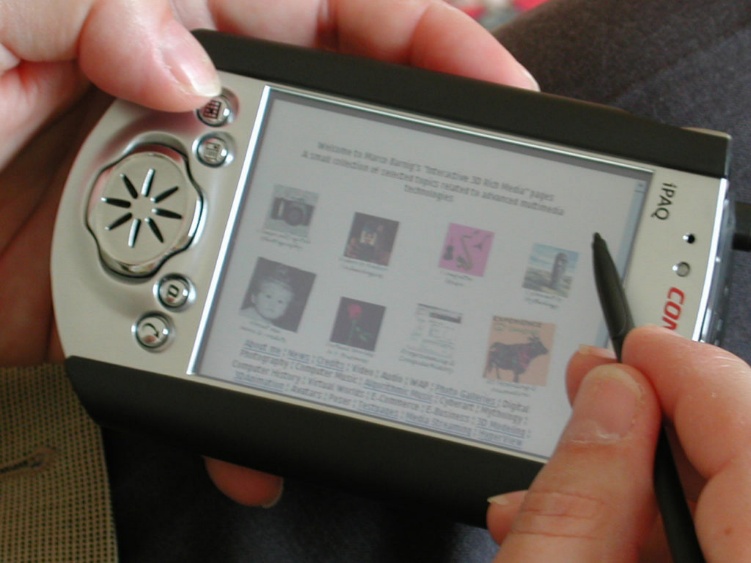
My first experience with the “Mobile First” concept dates back to June 2000, when I created a new version of my website on the P&T Webplaza using dynamic HTML on my Compaq iPaq.
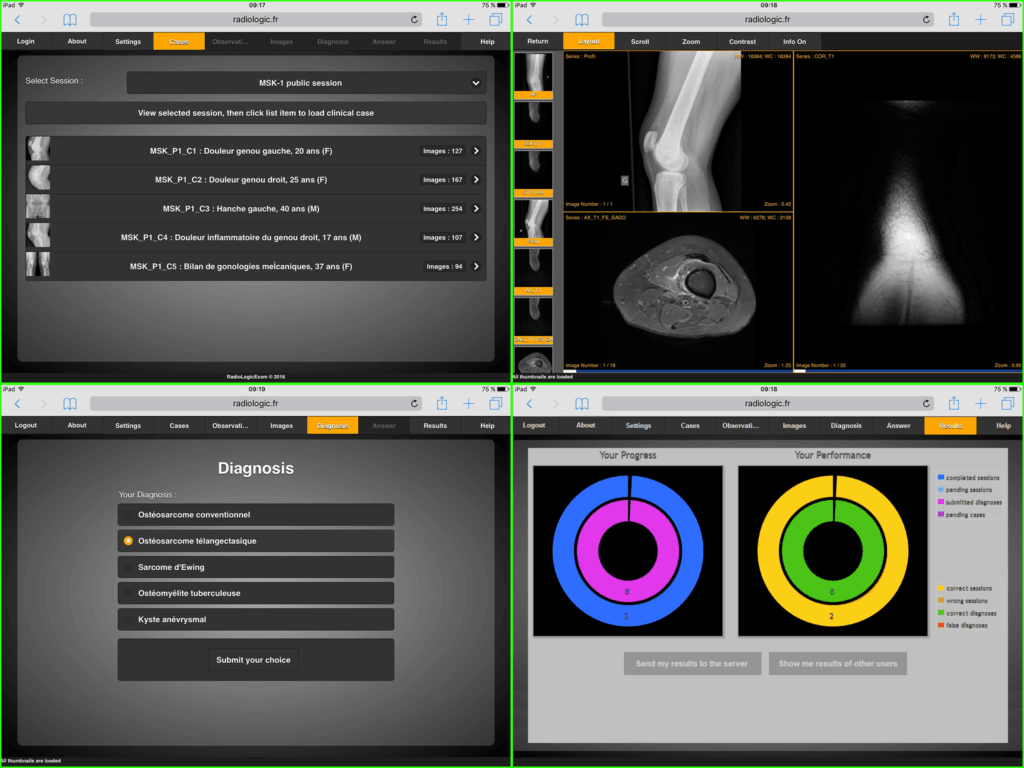
A more substantial experience began in mid-2015. I developed a training application for junior radiology residents at the University Hospital of Strasbourg. It is called RadioLogic and includes a series of projects on GitHub, some of which are related to displaying medical images on iPhones and iPads. At the time, I was a certified Apple developer.
I presented the project in December 2019 at the OrthancCON-2019 conference at the University of Liège, held at the Liège University Hospital. Moreover, the various DICOM sessions can be regarded as mini-apps.
Currently I have 270 GitHub repositories, most are private. Among the public repositores 39 are starred.
REST API & REACT
While browsing the Internet, visiting technical forums, and discussing with ChatGPT, I discovered the perfect solution for a Mobile First KI-Léierbud web page : a REACT application that fetches content from a CMS through a REST API. Since I was not familiar with REACT—because in recent years I had mainly programmed my applications in Python and Swift—I followed the instructions from a NextJS tutorial to develop a POC for converting JSON data retrieved via REST API from my WordPress server. The development was not too complicated, and the result was convincing.
What is REACT ?
REACT is a JavaScript library created by Facebook and maintained by Meta and by a large community.
REACT is a User Interface (UI) library.
REACT is a tool for building UI components.
REACT is the main UI for Mobile First webpages
There are numerous tutorials available on the web how to build REACT projects, for example on w3schools.com :
https://www.w3schools.com/whatis/whatis_react.asp
AI assisted development of REACT projects
Today the main platforms for AI assisted coding are Lovable.dev, Cursor, Claude-Code and ChatGPT-5.
An experienced user of such a platform can code a REACT app or a REACT template, ready for production, in 2 hours.
A new user can do it in 8 hours.
Lovable.dev
On February 21, 2025, Misch suggested that I participate in the creation of micro-applications for the LetzAI Playground and advised me to do so with the assistance of lovable.dev, a Swedish start-up offering an AI-assisted coding environment (powered by Anthropic’s Claude model). Here’s an excerpt from his message:
*Ech schécken der hei een heads-up: Mir lancéieren zesummen mat lovable.dev demnächst eng nei Initiativ déi dech kinnt interesséieren.
De LetzAI Playground: https://play.letz.ai/
Dat gëtt eng Gallery vu Micro Apps déi d’LetzAI API benotzen. Mir hu selwer wéis de do um Link gesäis schon eng Reih Apps gebaut, a mir fänken elo un aner Developeuren an Artisten ze sichen déi hir Applikatioun do wéilten gefeatured hunn. Si muss net mat lovable gebaut sinn, mee eis Erfahrung huet gewisen, dass et domadd am schnellste geet.*
I was fascinated by this new tool and created three applications for the LetzAI Playground: “Song Lyrics Illustrator”, “The Full Wine Glass Challenge”, and “Your Words, Your Vision”.
KI-Léierbud Prototype
After the launch at the end of May 2025 of the PLESK server and the WordPress CMS for the KI-Léierbud project, I used lovable.dev to create React prototypes for the “Knowledge”, “Quiz”, “Polls”, and “Hands-On” sections. I published detailed documentation on these projects in the internal “Development” section of the WordPress CMS (admin.ki-leierbud.lu). Unfortunately, I never received feedback from the partners.
I borrowed the term “Micro Apps” from Misch, and since my prototypes were more complex and larger than the LetzAI apps, I called them “Mini Apps”. I read online that this type of application and architecture are considered the future of dynamic websites.
Lovable.dev Contest
In mid-June 2025, lovable.dev organized a contest called “The AI Showdown”, where the company offered free access to its development environment over a weekend, providing three AI models: Anthropic Claude, Google Gemini, and OpenAI ChatGPT-4.
I defined two mini-applications:
- one for access to LuxASR, the Luxembourgish speech recognition project of the University of Luxembourg
- and one for restricted access to the randomuser.me test website.
The project names were “Lux-ASR Trial” and “Access-Brake-to-API”.
In total, there were six POCs, two prompts, and three AI models.
I evaluated the results of the six POCs according to several criteria and published them on LinkedIn:
👉 LinkedIn post
The winner was OpenAI, followed by Google. Anthropic came last. Of course, this evaluation is not representative.
Misch informed me that ChatGPT-5 is now integrated into lovable.dev. Unfortunately, my early-bird subscription at €20/month does not include this option. The current cheapest subscription costs €50/month.
VO POC “AI Image Generator”
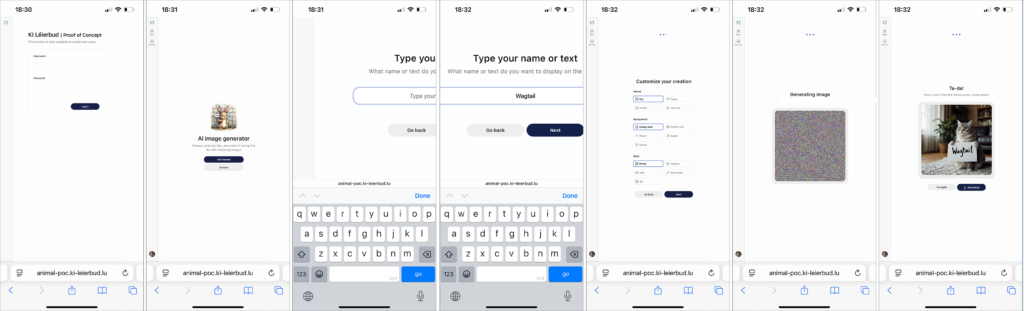
Following discussions with Benedikt about the development tools used by Visual Online, he shared the link to his POC
https://animal-poc.ki-leierbud.lu
an AI Image Generator mini-app created with Django — as well as two references to operational websites built with Wagtail.
I tested the POC on my iPhone and I wondered why it was not created as “Mobile First” project, knowing that the main discussions between the partners in the past few weeks were related to this topic, including the discussions with Chris Weber.
VO Reference Websites
I tested both Visual Online reference web sites on my smartphone and noticed that the web pages does not comply to the “Mobile First” concept. It is true that the content is adapted to different screen sizes, but important functions are missing. Both web sites are “state of art” for the target use and audience, but the design does not support all the functionalities required for the KI-Léierbud portal.
Wagtail
After my mail-discussion with Benedikt a few days ago, I installed a Wagtail server on my Ubuntu Linux development desktop. The promise on the Wagtail website
to set up a site in 10 minutes is not exaggerated. After pip install wagtail followed by a few Python commands, I was able to admire the homepage of my new site at http://127.0.0.1:8000/.
It is true that Wagtail is more modern and performant than WordPress, but it is still mainly a CMS. It is even possible to import WordPress content into Wagtail without major issues. The HTML source code generated by Wagtail sites is better structured than WordPress pages.
However, Wagtail has the same problem as WordPress: it is not optimized for delivering dynamic “Mobile First” web pages. On its own website, Wagtail recommends using it in headless mode (via REST API) with a REACT or Vue frontend.
Conclusions
Wagtail does not solve the urgent problem of developing REACT mini-applications powered by REST API from a headless CMS. If Visual Online considers it appropriate to quickly install a Wagtail CMS to eventually replace WordPress, I suggest proceeding as follows:
- For the “Knowledge” mini-applications, where a lot of content already exists in WordPress and where we plan to involve external authors, we continue the chosen path: a React application with WordPress REST API, to be developed by LetzAI based on my prototype presented and approved on 22.08.2025.
- For the “Quiz” and “Polls” mini-applications, where only a few examples are available until now, Visual Online can develop them in Wagtail, with a REST API interface for each application type (approx. 6 variants).
- For the “Hands-On” mini-applications, it will be decided on a case-by-case basis whether to build them in Wagtail or as standalone REACT app.
The CMS can also serve as a documentation center and as an accounting hub for our internal needs.
In a future step, we could migrate the WordPress content to Wagtail while adapting the REST API interface on both REACT and Wagtail sides to simplify the infrastructure.
But before taking a decision, we should take a deeper look at the concept of the mini-applications
Examples of Mini-Application Prototypes
To support understanding and decision-making, I present below a list of existing mini-applications, specifying the tools used to develop them, where they are hosted, and—where applicable—comments on their status.
RTL Multilingual News Reader
- created in November 2024
- hosted in the RTL Huggingface Account
- there are several dedicated news reader apps available
- runs on the OpenAI account of RTL
- needs an update and a conversion into a Hands-On mini-app with REACT
https://huggingface.co/spaces/rtllu/RTL_Multilingual_News_Reader
Text to interactive Heygen Avatar
- created a year ago
- implemented in the RTL Huggingface Account
- runs on my personal HeyGen Account
- high usage costs
https://github.com/mbarnig/Text_to_Avatar
Mäin éischt KI-Bild

- running in my Huggingface Account
- shared ZeroGPU (not always available)
- using costs included in my Huggingface Pro Account
- proposal to include this mini-app in the Hands-On KI-Léierbud apps
https://huggingface.co/spaces/mbarnig/My_first_AI_Image
AI Image Generator

- hosted in sub-domain app4.ki-leierbud.lu
- mini-App working with Huggingface API connected to my preceding app “Mäin éischt KI-Bild”
- created with lovable.dev early June 2025
- can be used as standalone mini-app when the AI model is implemented in the backend API server and GPU Worker
- can be hosted in /httpdocs sub-folder
Lyric Quiz : Human or AI
- hosted in sub-domain app5
- created with lovable.dev
- the layout with two articles in one page is not suitable ; I have to go back to an earlier version with one article per page
- the layout needs to be modified to comply with the approved template
- content fetched with REST API from WordPress
- can be easely converted into mini-app hosted in /httpdocs sub-folder
Easy Image Style Quiz : classification
- hosted in sub-domain app6
- created with lovable.dev
- the layout with two articles in one page is not suitable ; I have to go back to an earlier version with one article per page
- the layout needs to be modified to comply with the approved template
- content fetched with REST API from WordPress
- Moderate and Difficult quiz versions also available
- can be easely converted into mini-app hosted in /httpdocs sub-folder
Bits & Bytes Quiz : multiple choice
- hosted in sub-domain app7
- created with lovable.dev
- the layout with two articles in one page is not suitable ; I have to go back to an earlier version with one article per page
- the layout needs to be modified to comply with the approved template
- content fetched with REST API from WordPress
- can be easely converted into mini-app hosted in /httpdocs sub-folder
KI-Léierbud : what, why, when, who, .. (Knowledge)
- hosted in sub-domain app8
- created with lovable.dev
- can be used to test a working language switching
- the layout with two articles in one page is not suitable ; I have to go back to an earlier version with one article per page
- the layout needs to be modified to comply with the approved template
- content fetched with REST API from WordPress
- can be easely converted into mini-app hosted in /httpdocs sub-folder
Hello World php Trial
- hosted in sub-domain app9
- test related to my development of a WordPress plugin
- abandoned track
AI-Agent-Café
- mini-app developed by Olivier Koos
- code available on Github : https://github.com/koosoli/AI-Agent-Cafe
- working standalone mini application
https://ki-leierbud.lu/ai-cafe
Hello World Tutorial
- mini-app developed by me
- minimal working standalone test mini application
https://ki-leierbud.lu/helloworld
LetzAI Image Generator

- mini-app developed by me
- minimal working standalone test mini application
- image above generated with prompt “dog”
Visionaries (Knowledge)
- Prototype index.html, assets/app.js, assets/app.css developed with the assistance of ChatGPT-5
- working knowledge mini-app
- can be used for all knowledge sequences with the URL suffix /?id=ID
- can be used for language change with the URL suffix /?lang=xx
- approved template for knowledge sequences
- different knowledge mini-apps can be defined by changing the first english article ID of a sequence inside the app.js file
https://ki-leierbud.lu/knowledge/visionaries/
Record & Transcribe Speech
- use of the Lux-ASR API
- developed with lovable.dev in June 2025 during the AI Showdown
- standalone mini-app
- hosted at lovable.app
- can be easely converted to a standalone mini-app in a folder inside the PLESK root /httpdocs
https://openai-speak-luxasr.lovable.app
In my other contributions
https://admin.ki-leierbud.lu/archives/1996
https://admin.ki-leierbud.lu/archives/2220
I will present more infos about the mini-applications and the Figma design.